


[S]ince our transition to the Talk commenting platform, we’ve received dozens of helpful questions and comments from readers. Thanks to your feedback, we’ve worked out some kinks and started targeting future upgrades.
Keep your questions coming. In the meantime, here are a few updates and FAQs:
Where are my old comments?
As of this week, comments from before the transition are now visible. Restoring these posts was always part of the plan, but it took us a few weeks longer than we expected to make the full archive visible. Thanks for your patience on this.
If you used the same email address in our old (Disqus) and new (Talk) systems, then your old comments should appear under your new account.
Where’s my comment?
We moderate every comment submitted to the site, so it’s likely that your comment is awaiting review.
To find out, log into Talk on any article page and check out the new “My profile” tab.
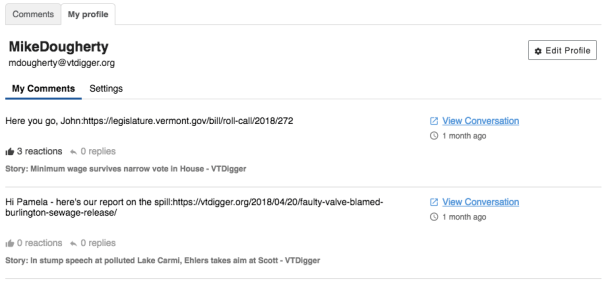
Under “My Comments,” you’ll see the status of your most recent submissions.
How do I change my username?
 Head over to your profile and click the “Edit Profile” button. From here, you can change both the username and email address associated with your Talk account.
Your username must include your first and last name. Note that you can only change your username once every 14 days.
If you change your email address, be sure to remember your new credentials the next time you log in. The login screen will always ask for the email address currently associated with your account.
How can I see how many comments have been posted on an article?
Currently, you’ll need to scroll down to the comments section on each article and look at the number on the “All Comments” tab.
Lots of you have let us know you miss our old “preview” function: the numerical icon next to each headline that let you see how many comments have been posted. We miss it, too. So we’re currently working on building a similar feature into the new system. Stay tuned for that update.
Why can’t I downvote a post I don’t like?
Instead of upvotes and downvotes, the Talk system uses a “Respect” button. Use it to amplify posts you agree with or appreciate.
This system deliberately doesn’t include downvotes. Our hope is that this will encourage more constructive conversation. The purpose of the forum is not to shut down posts you disagree with — it’s to provide a space for you to share your own thoughts, like a “Letters to the Editor” page.
 If you believe another user’s posts violate our Community Guidelines, use the “Report” button to let us know. We’ll make a determination from there.
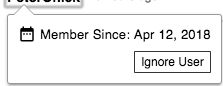 If another user’s posts bother you, but they don’t quite violate our policies, you can also “Ignore” that user. Just click on their username and hit “Ignore User” to stop seeing their posts. They won’t be notified, and you can always change their status in your “Settings” tab.
Why can’t I leave a comment on an old article?
For the past few weeks, we’ve maintained a new policy that comment threads close after five days. We’ve heard from readers that this wasn’t enough time for dialogue, so we’re lifting that limit for now. As of now, comment threads on new articles will stay open.
Can I edit my comment?
After submitting a comment, you have two minutes to make changes. Once that window has closed, you’re no longer able to edit your post. If you want a comment deleted after that, email comments@vtdigger.org for assistance.
How do I sign up in the new system?
Follow the instructions below, and email comments@vtdigger.org if you have any questions.

Thanks for joining the conversation.

