In recent weeks, Facebook announced changes to its News Feed tool that will reduce the number of news articles readers see on the platform.
In his latest post on the subject, Facebook CEO Mark Zuckerberg wrote that the company will not only favor posts from family and friends over posts from publishers and other organizations, but the News Feed algorithm will also prioritize “trusted sources” of news.
The move follows more than a year of criticism about the platform’s role in spreading misinformation during the 2016 election.
Facebook is the leading social network among VTDigger readers. While many opt to read our stories on our home page or from our email newsletters, we want to continue to make our news available on Facebook for those who prefer it.
If you’d like to ensure that you keep seeing VTDigger stories and videos in your News Feed — despite changes to Facebook’s technology — please follow the recommendations below.
- First, be sure to Like VTDigger’s Facebook page.
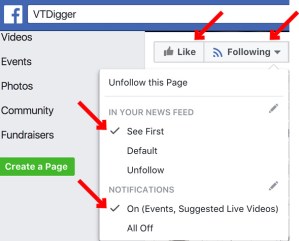
- Follow VTDigger’s Facebook page to subscribe to updates. Under “Following,” select “See First” in your News Feed and turn Notifications “On.”
- If you’re presented with a quality survey from Facebook, let them know that you consider VTDigger a known, trusted news source.
- Use the instructions below to prioritize VTDigger posts in your News Feed.
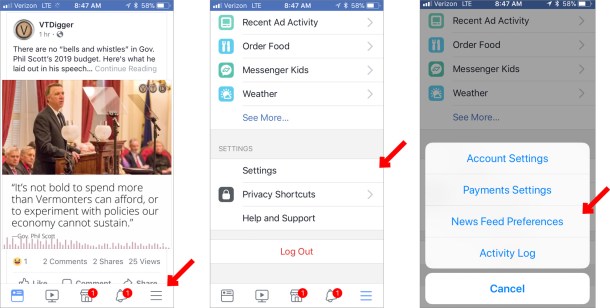
On a mobile device:
- Press the menu icon (three lines).
- Select “Settings.”
- Select “News Feed Preferences.”
- Select “Prioritize who to see first.”
- Scroll down or search for VTDigger, and select the VTDigger icon.
- Press “Done.”

On a desktop web browser:
- Click on the menu icon (down arrow) in the upper right-hand corner of the Facebook home page.
- Select “News Feed Preferences.”
- Select “Prioritize who to see first.”
- Scroll down to find VTDigger (you may also use the left-hand drop-down menu to select “Pages Only” to narrow your search). Select the VTDigger icon.
- Press “Done.”